I am enjoying the TryHackMe SOC Level 1 course and have learned a lot from it so far. I recommend it to anyone looking to learn more about SOC fundamentals and security operations. I will update this page as I complete more rooms and labs.
Concepts that will be Covered in the Course
- Blue team introduction
- SOC Team Internals - Essential SOC skillys to triage, classify, and escalate alerts in real SOC environments.
- Core SOC Solutions - EDR, SIEM, Splunk, Elastic Stack (ELK), and SOAR
- Cyber Defense Frameworks - Pyramid of Pain, Cyber Kill Chain, Unified Kill Chain, MITRE
- Phishing Analysis - Introduction to Phishing with SOC simulator
- Network Traffic Analysis- Netowrk traffic analysis with Wireshark and NetworkMiner
- Network Security Monitoring - Network discovery detection, data exfiltration detection, IDS, and Snort.
- Web Security Monitoring - Detecting Web Attacks, Web Shells, and Web DDOS
- Windows Security Monitoring - Detecting Windows attacks
- Linux Security Monitoring - Detecting Linux attacks
- Malware Concepts for SOC - Malware classification and analysis and detecting living off the land attacks
- Threat Analysis Tools - Threat intelligence to detect, investigate and defend against adversaries
- SIEM Triage for SOC - Log analysis with SIEM, Alert Triage with Splunk and Elastic (ELK)
- SOC Level 1 Capstone Challenges
Tools & Technologies used so far
- SOC alert triage, reporting, workbooks, metrics and a lab for introduction to Phishing with SOC simulator
- EDR, SIEM, Splunk, Elastic Stack (ELK), and SOAR
- I will update this list as I complete more rooms and labs.
What I learned and Hands-On Experience
To demonstrate my understanding and practical skills, I completed the following hands-on rooms and exercises from the TryHackMe SOC Level 1 path:
Section 1: Blue Team Introduction
Blue Team and SOC fundamentals — why defensive security matters, how SOCs are structured, and where analysts fit in day-to-day operations.
-
Room: SOC Role in Blue Team
Learned what SOC is responsible for, how internal SOCs differ from MSSPs, and modern SOC career paths.
Internal SOC vs MSSP
- Internal SOC: One org, fewer tools but deep knowledge; limited attack variety.
- MSSP: Many clients, broad tool/attack exposure; breaches and incidents often.
- Both build core skills: depth (internal) vs breadth (MSSP).
Career Tips
- Learn from every alert—understand why the rule fired.
- Think like an attacker: "why?" before "how?".
- Verify everything; never assume.
- Get involved in real incidents when you can.
-
Room: Humans as Attack Vectors
Learned why and how people are targeted in cyber attacks and how the SOC helps defend them.
The Human Element
- Humans targeted for access (mailboxes, apps, internal systems).
- Easier to trick a gatekeeper than break in directly.
Attacks on Humans
- Social engineering: people manipulated to help attackers.
- Phishing: fake trusted emails to get clicks/attachments (most common).
- Malware downloads: malicious files disguised as legitimate.
- Deepfakes: AI-generated fake video/audio.
- Impersonation: posing as trusted people/orgs for access.
Defending Humans
- Mitigation (prevent/reduce) + Detection (SOC finds what gets through).
- Mitigation: AV/EDR, anti-phishing, awareness training, "trust but verify" for deepfakes.
- SOC: Detect and Investigate attacks.
- Stay informed: Krebs on Security, The Hacker News, BleepingComputer.
-
Room: Systems as Attack Vectors
Learned how attackers exploit vulnerable and misconfigured systems, and how to protect them.
Definition of a System
- Attackers target insecure systems directly (no user interaction needed).
Attacks on Systems
- Software vulnerabilities: 40K+ CVEs/year; 300+ actively exploited.
- IT risks: weak passwords, overprivileged access.
- Supply chain: malicious updates via trusted app/library (e.g. SolarWinds, 3CX).
Vulnerabilities
- Flaws can exist years before discovery (e.g. Shellshock since 1992, found 2014).
- Zero-day: attackers find first; SOC detects exploitation before patch.
- CVE: public vulns get CVE IDs; race to patch vs exploit.
- Zero-day mitigation: restrict IPs, vendor workarounds, block patterns on IPS/WAF.
Misconfigurations
- Setup mistakes (e.g. weak default passwords), not code bugs; fix with hardening.
- Proactive reduction: pentesting, vuln scans, config audits (e.g. CIS).
Conclusion
- Understand attacks/defenses and share with IT. Stay current; recommended: The DFIR Report, CISA KEV, BleepingComputer, CheckPoint Threat Map.
Section 2: SOC Team Internals
For this section I explored the essential SOC analyst skills to help triage, classify, and escalate alerts in real-world SOC environments.
-
Room: SOC L1 Alert Triage
What I Learned:
- Understood SOC alerts and how they are generated.
- Explored alert fields, statuses, and classification.
- Learned alert triage as an L1 analyst.
- Practiced with real alerts and SOC workflows to build speed and consistency.
- Prepared for SOC Simulator and SAL1 certification.
Events and Alerts
- Alert solutions: SIEM (Splunk ES, Elastic), EDR/NDR (Defender, CrowdStrike), SOAR (aggregate alerts), ITSM (Jira, TheHive).
- L1: triage, escalate to L2 if real threat. L2: deep analysis/remediation. Engineers: alert quality. Manager: triage speed/quality.
Alert Properties
- Time, Name, Severity, Status: When created, rule name, urgency, in progress/closed.
- Verdict: True Positive (real threat) vs False Positive (noise).
- Assignee, Description, Fields: Owner, rule logic/how to triage, analyst comments/trigger values.
Alert Prioritization
- Filter: new/unresolved only. Sort by severity (critical first), then by time (oldest first—may be further along).
Alert Triage
- Initial: Assign to self, In Progress, review name/description/indicators.
- Investigation: Who is affected, what action, surrounding events, threat intel; use workbooks if available.
- Final: True/False Positive, comment with reasoning, close.
-
LAB: SOC L1 Alert Reporting
What I Learned:
- Understood need for SOC alert reporting and escalation
- Learned how to write alert comments or case reports properly
- Explored escalation methods and communication best practices
- Applied knowledge to triage alerts in simulated environment
- Feel more confident in SOC Simulator and during SAL1 certification
Alert Funnel
- Reporting: Document details and evidence before close/escalate; critical for True Positives.
- Escalation: True Positive needing L2 → escalate with report so L2 has context.
- Communication: IT (e.g. confirm admin access), HR (e.g. new hire info) as needed.
Reporting Guide
- Purpose: context for L2, records (alerts kept longer than raw logs), sharpen L1 skills.
- Five Ws: Who (user/host), What (action/sequence), When (start/end), Where (device/IP/site), Why (verdict reasoning).
-
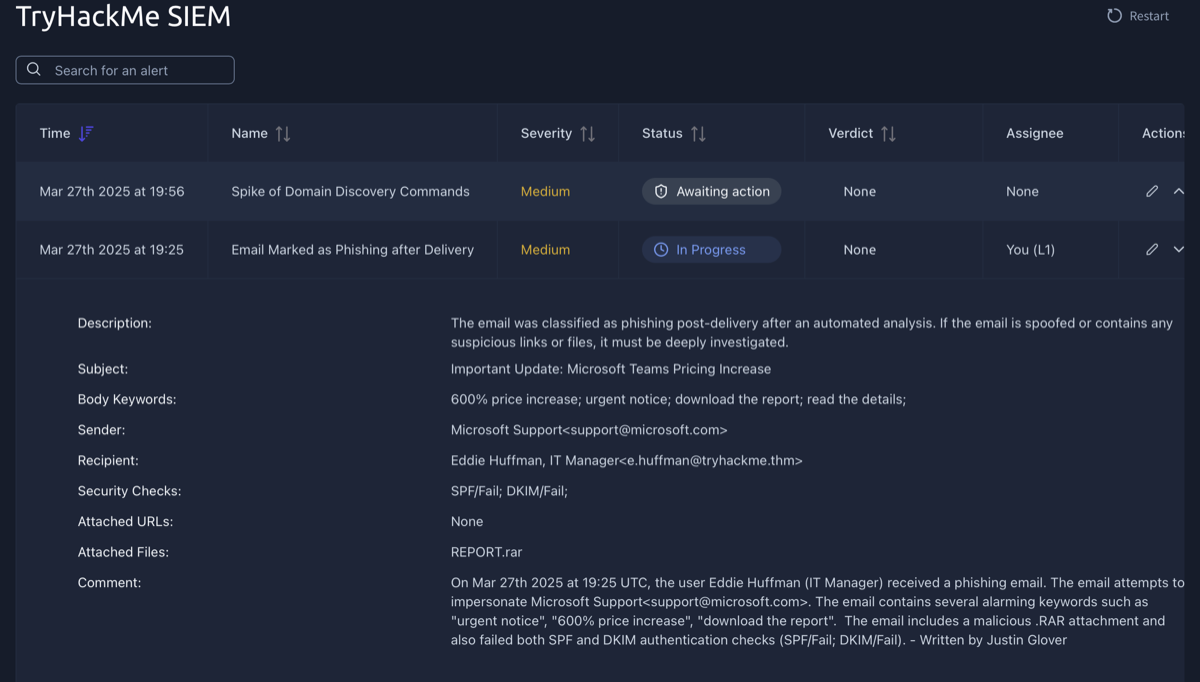
This task involved writing an alert report for a True Positive alert. The alert is described above, and my alert report is in the comments section as indicated by "Written by: Justin Glover".
Escalation Guide
- Escalate when: major attack/DFIR needed, remediation required (isolate host, reset password), external comms (customers/LE), or unsure—ask L2 rather than close unclear.
-
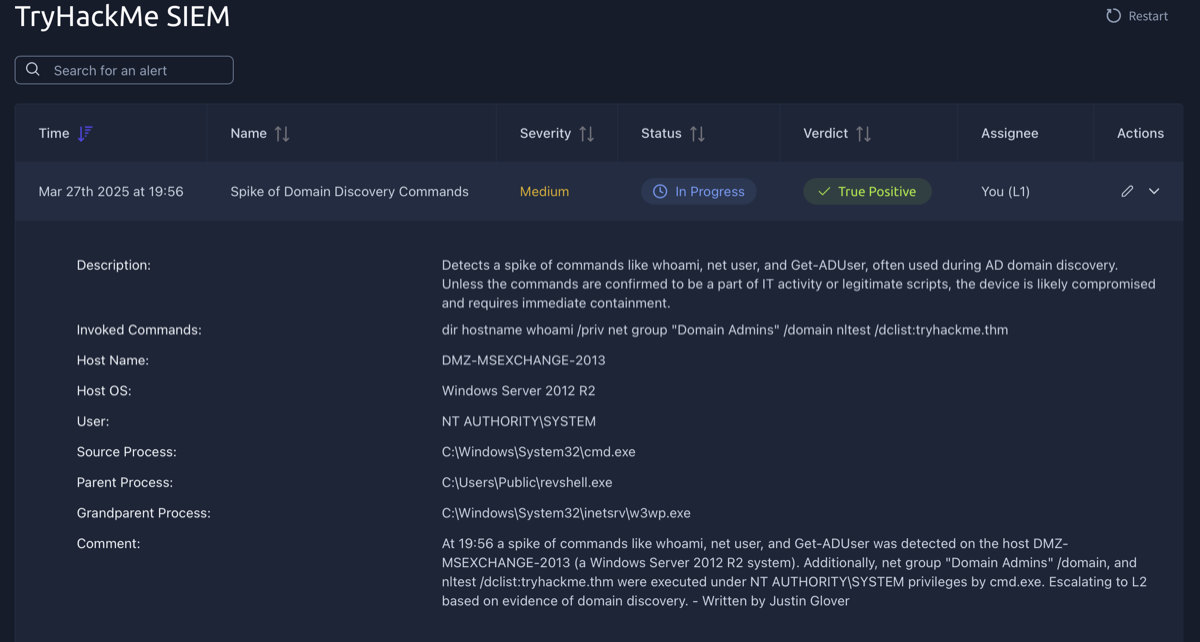
This task involved writing an alert report and escalating it to L2. The alert is described above, and my alert report is in the comments section as indicated by "Written by: Justin Glover".
-
Room: SOC Workbooks & Lookups
What I Learned:
- Discovered SOC investigation workbooks
- Learned where to find and how to use asset inventory in the SOC
- Importance of corporate network diagrams
- Practiced workflow building inside an interactive interface
Assets and Identities
- Identities: AD/Entra ID, SSO (Okta, Google), HR (BambooHR, SAP, HiBob), or custom (CSV/Excel).
- Assets: AD, SIEM/EDR (host data), MDM (Intune, Jamf), or custom.
-
Room: SOC Metrics and Objectives
What I Learned:
- SLA, MTTD, MTTA, and MTTR metrics
- The importance of the False Positive rate
- Why and how to improve the metrics as an L1 analyst
- Practice with managing SOC team performance metrics
Core Metrics
- AC = Total Alerts → analyst load. FPR = False Positives / Total → noise; high FPR → tune rules, automate.
- AER = Escalated / Total → L1 experience (target <50%, ideally <20%). TDR = Detected Threats / Total → SOC reliability (aim 100%).
- Improve: high FPR → exclude trusted activity, SOAR; long MTTD/MTTA/MTTR → real-time logs, notifications, escalate faster, document procedures.
-
LAB - Phishing Simulator using Splunk
Learn how to use SOC Simulator by completing your first scenario. Close all True Positive alerts to pass!
Scenario objectives
- Monitor and analyze real-time alerts.
- Identify and document critical events such as suspicious emails and attachments.
- Create detailed case reports based on your observations to help your team understand the full scope of alerts and malicious activity.
Section 3: Core SOC Solutions
This section covers EDR, SIEM and SOAR, the core security solutions used in a SOC.
-
Room: Introduction to EDR
What I Learned
- EDR basics, architecture, telemetry; detection/response; AV vs EDR; investigated alert in EDR.
What is an EDR?
- Endpoint Detection and Response: deep endpoint protection (visibility, detection, response).
EDR Solutions
- CrowdStrike Falcon, SentinelOne, Microsoft Defender for Endpoint, OpenEDR, Symantec EDR.
Three Pillars
- Visibility: Monitor/collect endpoint data (processes, registry, files, user actions).
- Detection: Signatures + behavior + ML; fileless malware; custom IOCs; MITRE ATT&CK.
- Response: Isolate host, kill process, quarantine file, remote access from console.
Beyond the Antivirus
- AV: signature check only; unknown threats slip through.
- EDR: behavior monitoring, full context, org-wide visibility; catches advanced/fileless.
Attack Steps AV's Response EDR's Response Step #1 No signature → does nothing Logs download, monitors Step #2 winword.exe = legitimate, no flag Records execution, keeps monitoring Step #3 Macro no signature → no flag Flags winword→PowerShell parent-child Step #4 Obfuscated PowerShell often missed Flags obfuscated script Step #5 No memory monitoring → misses injection Detects process injection in svchost Step #6 No network visibility Flags svchost outbound connection Final May mark clean Alert + full chain; analyst can respond from EDR How EDR Works
- Agents: On endpoints; monitor in real time; send data/detections to console.
- Console: Correlates data (logic, ML, TI); produces alerts; dashboard.
- Analyst: Triage by severity, review context, True/False Positive, respond from console.
- EDR integrates with SIEM as central platform.
EDR Telemetry
- Data from endpoints: process activity (parent/child), network (C2, lateral movement), CMD/PowerShell, file/registry changes.
- Used to reconstruct timeline, root cause, full attack chain.
Detection & Response
- Detection: Behavioral (e.g. winword→powershell), anomaly (baseline deviation), IOC, MITRE ATT&CK, ML (fileless/chained).
- Response: Isolate host, terminate process, quarantine file, RTR (remote shell), artifact collection (memory, logs, registry).
-
Room: Introduction to SIEM
What I Learned
- Log source types, SIEM importance/features, ingestion, alerting and analysis process.
Log Sources
- Host-centric: Endpoints/servers—file access, auth, process, registry, PowerShell.
- Network-centric: Firewalls, IDS/IPS, routers—SSH, web, VPN, file sharing.
- Challenges: many sources, no centralization, limited context per log, format differences.
Why SIEM?
- Collects, normalizes, and correlates logs; detection rules → alerts.
- Central collection (agents/APIs), normalization (parsing → fields), correlation (link events across sources).
- Real-time alerting; dashboards (alerts, failed logins, events, rules, top domains).
Log Sources & Ingestion
- Devices = log sources; logs forwarded to SIEM.
- Windows: Event Viewer, Event IDs. Linux: /var/log (httpd, cron, auth.log/secure, kern). Web: /var/log/apache, httpd.
- Ingestion: Agent/forwarder, Syslog, manual upload, port forwarding.
Alerting Process
- Detection rules (field-value logic) → alerts. Examples: 5 failed logins, USB plugged in, outbound >25 MB.
- Rules from normalized logs (e.g. EventID 104 → log cleared; 4688 + whoami → WHOAMI execution).
- Investigation: review events, True/False Positive. FP → tune rule. TP → investigate, contact owner, isolate/block if malicious.
-
LAB: Splunk The Basics
Splunk Components
- Forwarder: Agent on endpoints; sends data to Indexer (web, Windows, Linux, DB logs).
- Indexer: Receives, parses, normalizes, stores; makes data searchable.
- Search Head: SPL interface; search → indexer → events; tables/visualizations.
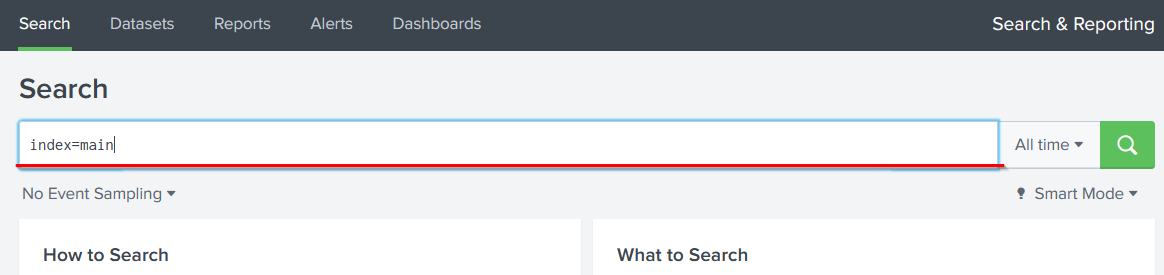
Lab - Ingesting & Analyzing VPN Logs
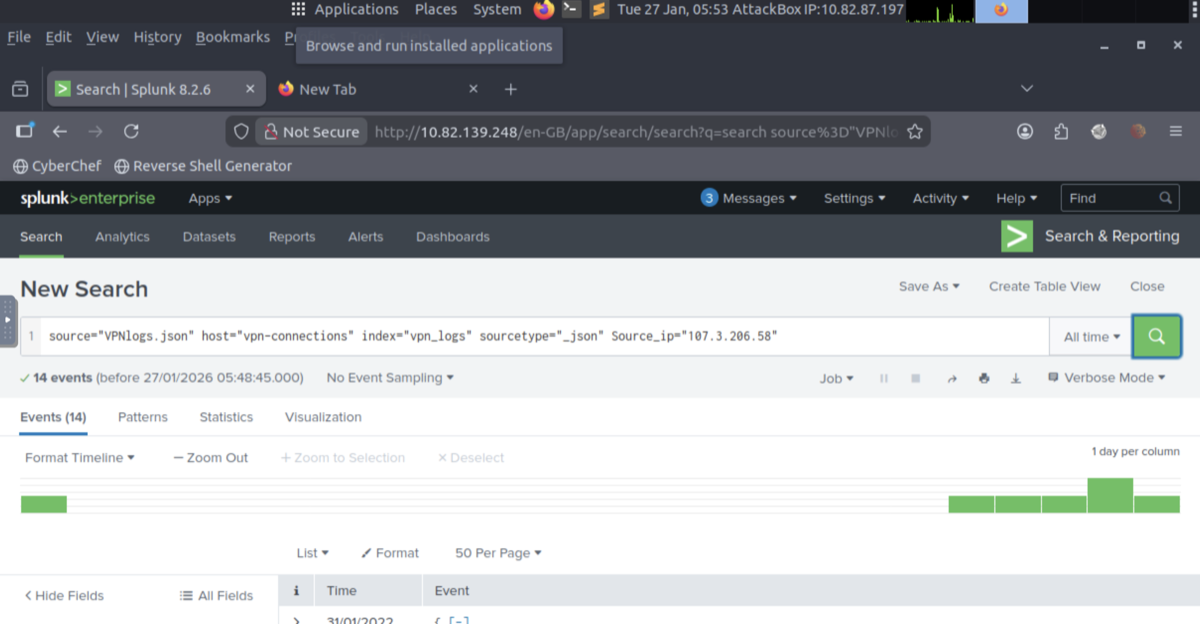
- Uploaded VPN log file; created index VPN_Logs; verified searchable events.
- SPL: count events, filter by user/IP/country, answer lab questions (e.g. username for IP, events excluding France).
-
Room: Elastic Stack: The Basics
Elastic Stack Overview
- Elasticsearch: Search/analytics engine; stores/correlates JSON data; REST API.
- Logstash: Pipeline: input → filter (parse/normalize) → output (Elasticsearch, Kibana, etc.).
- Beats: Lightweight shippers (Winlogbeat, Packetbeat) → Elasticsearch.
- Kibana: UI for search, visualizations, dashboards.
- Flow: Beats/Logstash → Elasticsearch → Kibana.
Discover Tab
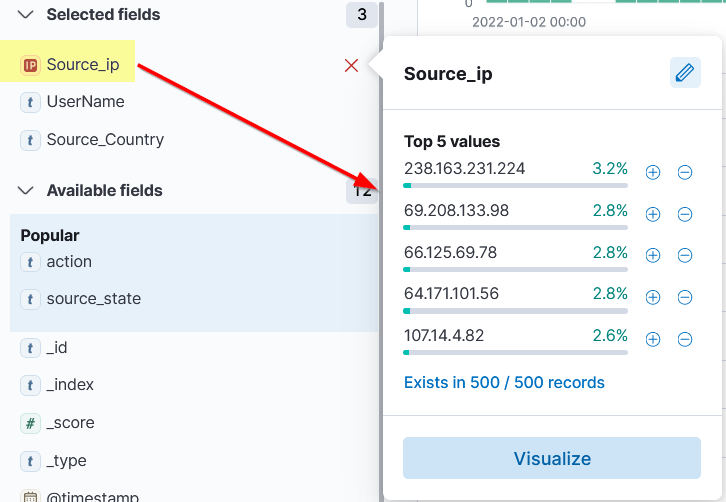
- Primary workspace: logs (rows = events), Fields pane (+/– filters), Index pattern, Search bar, Time filter, Timeline (spikes).
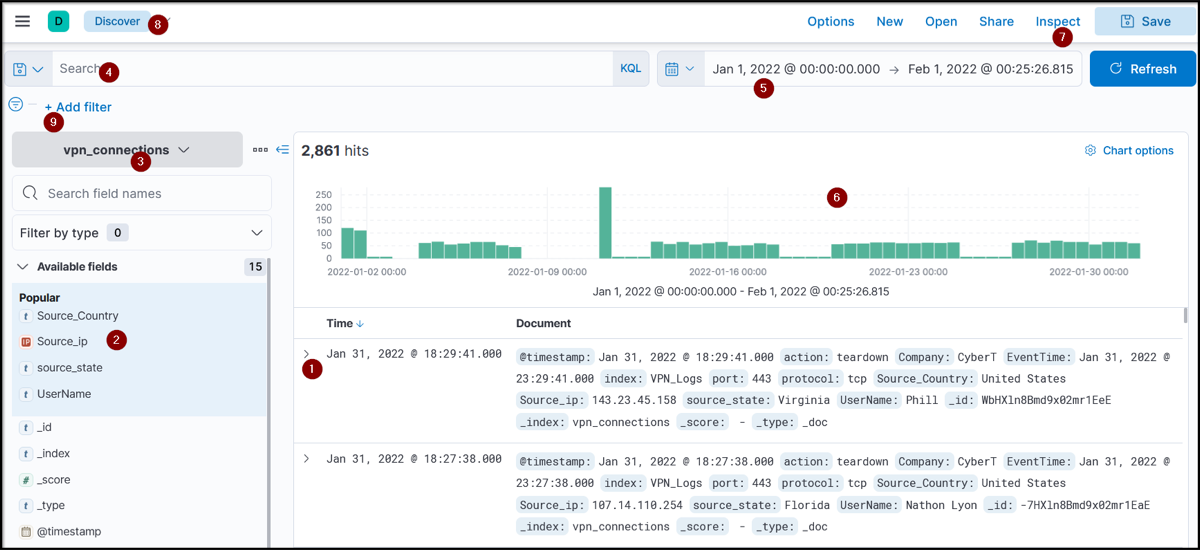
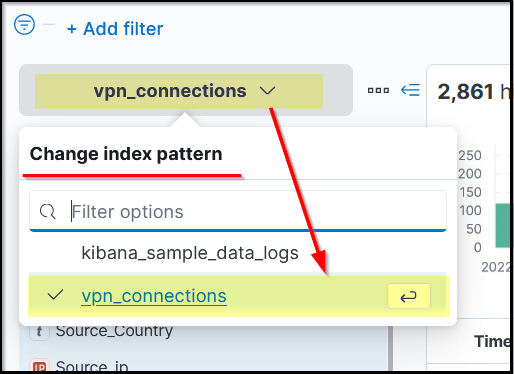
- Index pattern: defines which data Kibana searches; per data source. Fields pane: normalized fields, quick filters.
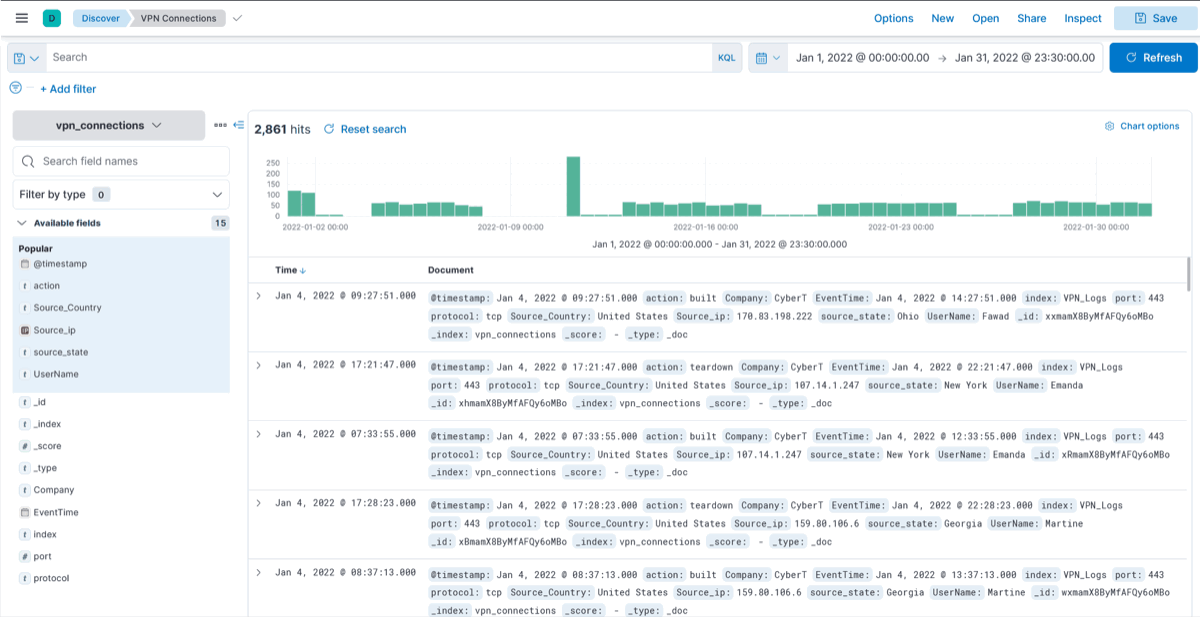
- Create table: select fields from log → table view; save/reuse.
- LAB: index selection, time/field filtering, spike analysis, table creation.
KQL (Kibana Query Language)
- Search bar: free text (term across fields) or field-based (Field : Value).
- Wildcards: * (e.g. United*). AND, OR, NOT for logic.
- LAB: KQL for United States + users James or Albert:
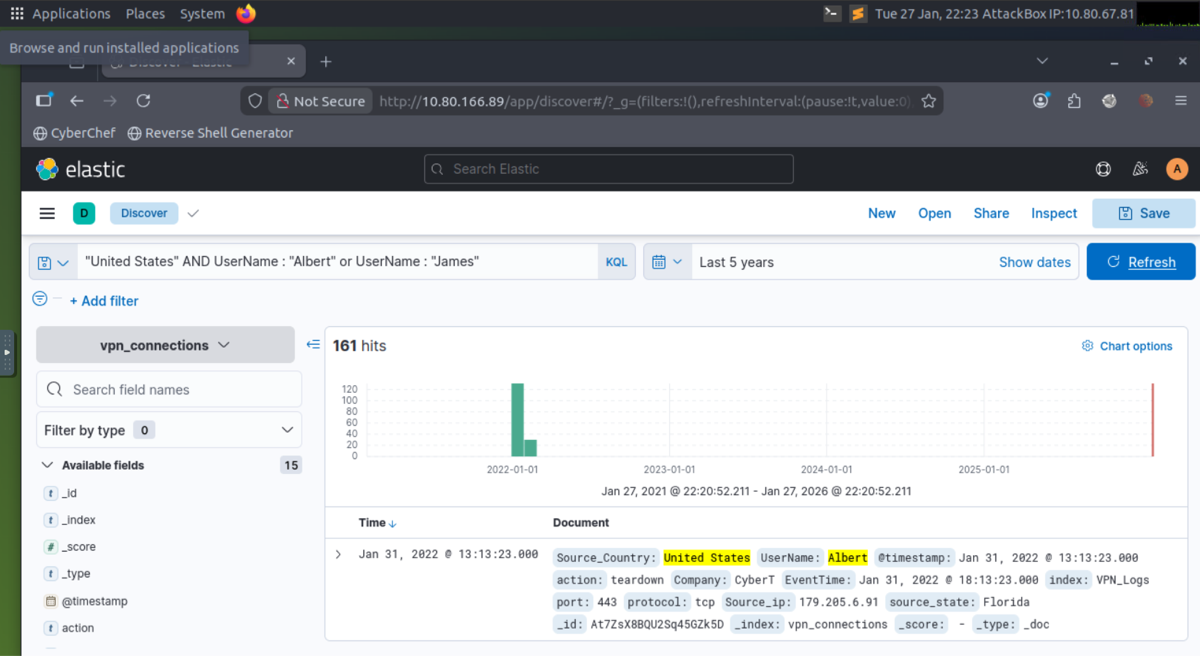
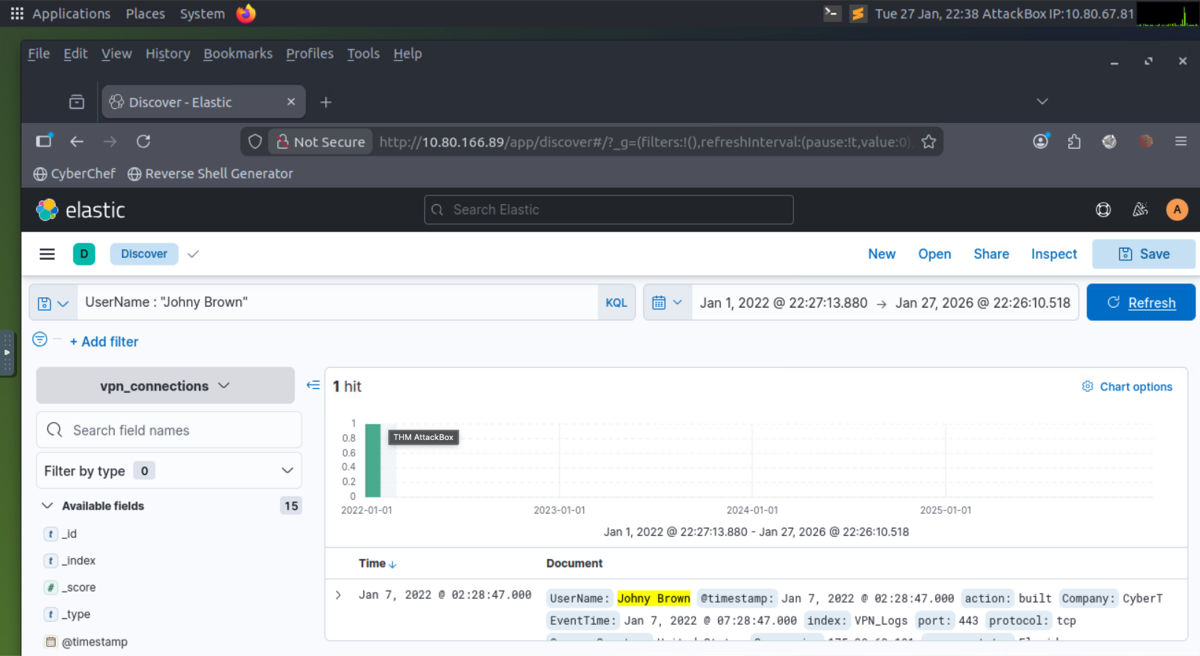
- LAB: A user was terminated on January 1, 2022, created a search query to determine how many times a VPN connection was observed after his termination.
-
Room: Introduction to SOAR
Traditional SOC and Challenges
- SOC: centralized monitoring, detection (SIEM), remediation (EDR, firewall, IAM), threat intel, comms with IT/management.
- Challenges: alert fatigue, disconnected tools, manual/undocumented processes, talent shortage → burnout, slower response.
Overcoming SOC Challenges with SOAR
- SOAR: Unifies SIEM, EDR, firewall, IAM, TI; ticketing/case management.
- Orchestration: Coordinates tools, playbooks (step-by-step workflows). Example: VPN brute force → SIEM query, TI check, escalate.
- Automation: Playbooks run automatically (e.g. alert → query SIEM, check IP, disable user if malicious, open ticket).
- Response: Block IP, disable user, open ticket from one interface.
- Analysts still needed: Complex investigations, judgment, playbook creation/tuning; SOAR automates repetitive work.
Building SOAR Playbooks
- Phishing playbook: Alert → ticket → check URL/attachment → sandbox/TI → malicious: remediate; benign: close. Conditional logic.
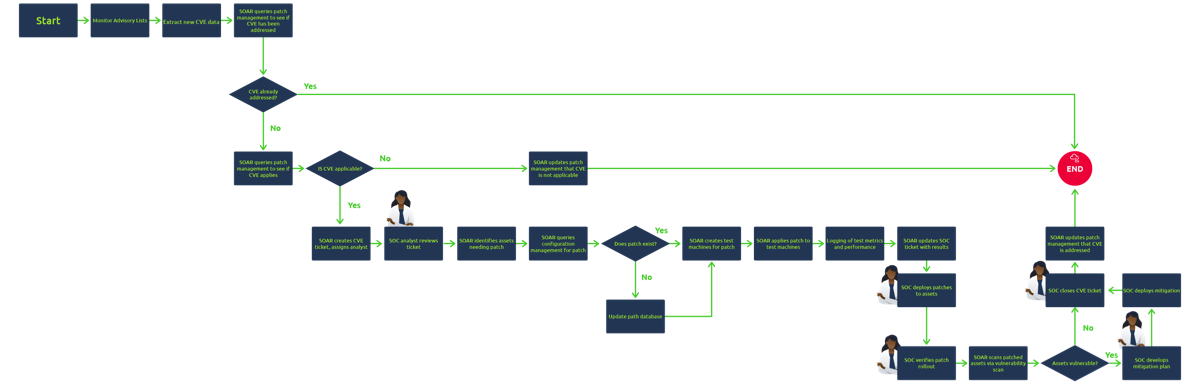
- CVE patching: Ingest CVE → severity/risk → find vulnerable systems → ticket → test → push patch. High volume; automation reduces backlog.
- Analysts involved at key decision points; SOAR doesn’t replace them.
Section 4: Cyber Defense Frameworks
Pyramid of Pain, Cyber Kill Chain, Unified Kill Chain, and MITRE help understand adversarial behaviour and harden detection, triage, and response.
-
Room: Cyber Defense Frameworks
Pyramid of Pain
The Pyramid of Pain ranks IOCs by how much "pain" it causes the attacker when you detect and block them. Bottom = trivial for attacker to change; top = tough. The higher you detect, the more time and effort the attacker needs to adapt.
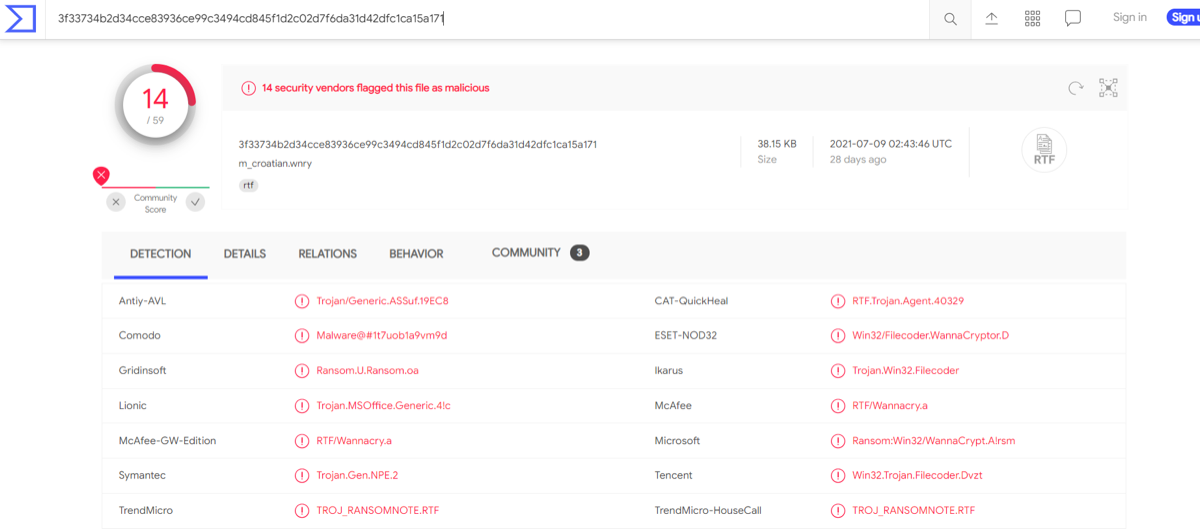
- Hash (Trivial) — bottom: Fixed-length value identifying a file (MD5, SHA-1, SHA-256). Used for malware IDs and IOCs; lookup with VirusTotal, MetaDefender. Limitation: one-bit change → completely new hash; easy to evade; weak for long-term hunting.
- IP (Easy) — green level: Identifies a device on the network. Defensive use: block/drop malicious IPs at the firewall. Limitation: attacker can switch to a new IP easily. Fast Flux: DNS technique—many IPs mapped to one domain, IPs constantly change; evades IP blocking. Palo Alto Fast Flux 101.
- Domain (Simple): Human-readable map to IP (e.g. evilcorp.com, tryhackme.evilcorp.com). Harder than IP: attacker must purchase, register, modify DNS. Punycode = Unicode→ASCII for non-ASCII domains. Attackers hide behind shorteners (bit.ly, tinyurl.com); detect via proxy/web logs. Any.run sandbox: Networking tab = HTTP requests, Connections (C2, FTP), DNS requests.
- Host Artifacts (Annoying) — yellow zone: Traces left on a system: registry values, suspicious process execution, attack patterns, IOCs, files dropped or modified. Attacker must change tools/methods → more time and resources. More pain than hash or IP.
- Network Artifacts (Annoying): Observable in traffic: User-Agent (RFC 2616), C2 info, URI patterns, HTTP POST patterns. Attacker must modify tools/tactics; gives defenders more time to respond. Detect with Wireshark/TShark, IDS (e.g. Snort).
- Tools (Challenging): Attacker must abandon or build new tools (more time, money, skill)—often game over. Examples: maldocs, backdoors, custom .exe/.dll, payloads. Defenders use: AV signatures, SIEM/EDR rules, YARA. Resources: MalwareBazaar, Malshare, SOC Prime. Fuzzy hashing (SSDeep): similarity analysis to catch variants that evade hash-based detection.
- TTPs (Tough) — top: Tactics, Techniques, Procedures = MITRE ATT&CK (phishing → persistence → lateral movement → exfil). Detecting and responding to TTPs quickly leaves the attacker little chance. Example: detect Pass-the-Hash via Event Log → find compromised host → stop lateral movement.
-
Room: Cyber Kill Chain
The Cyber Kill Chain® (Lockheed Martin, 2011) breaks a cyberattack into ordered stages from recon to impact. For an attack to succeed, the adversary must progress through all phases. As a defender, you use it to understand where intrusions happen, assess your security posture, identify missing controls, and recognize attacker goals—useful for SOC analysts, threat hunters, and incident responders.
Overview
- Phases: Reconnaissance → Weaponization → Delivery → Exploitation → Installation → Command & Control → Actions on Objectives.
Reconnaissance
- Research/planning: gather infrastructure, employees, processes, tech; often passive and undetected. Poor recon → sloppy attacks; strong recon → targeted payloads.
- OSINT: Public sources (search, media, social, WHOIS). Passive: no direct contact (WHOIS, scraping). Active: direct (social engineering, port scan).
- Email harvesting for phishing. Tools: theHarvester (emails, subdomains, IPs), Hunter.io (contacts per domain), OSINT Framework (tool collection).
Weaponization
- After recon, attacker turns raw info into attack tools—crafting malware and exploits into a payload. Many use automated tools or buy malware on the Dark Web; APTs/sophisticated actors write custom malware to evade detection.
- Terms: Malware = program designed to damage, disrupt, or gain unauthorized access. Exploit = code that takes advantage of a vulnerability in an app/system. Payload = malicious code the attacker runs on the system.
- Tactics: Infected Office doc with malicious macros/VBA; malicious payload or worm on USB, distribute in public; set up C2 infrastructure (execute commands, deliver more payloads); backdoor on victim host (access, bypass security); tailor phishing templates or OAuth-consent apps to look legitimate.
Delivery
- Attacker chooses how to transmit the payload into the target. Common methods:
- Phishing: Malicious email (spear = one target, broad = many) with malicious link or attachment → compromise. Often follows recon to pick targets.
- USB drops: Physical delivery in public (coffee shops, car parks, street). Sophisticated variant: company logo on USBs, mailed as “gift” from “customer” to get devices inside.
- Watering hole: Compromise a site the target group often visits; redirect to malicious site or serve drive-by download (e.g. fake “update” or malicious browser extension pop-up).
Exploitation
- Attacker's code runs on the target, abusing a vulnerability. Techniques: Malicious macro (e.g. from phishing email—runs when victim opens doc; can execute ransomware). Zero-day—unknown, unpatched flaw; no detection at first. Known CVEs—exploit unpatched public vulns in the environment.
- After access, attacker may exploit software/system/server vulns to escalate privileges or move laterally.
- Signs of exploitation: Unexpected process spawns; registry changes or new services; suspicious command-line arguments in system logs.
Installation
- Backdoor = access point; bypasses security, hides access. Attacker needs persistent backdoor to reconnect if connection is lost, access is removed, or system is patched.
- Persistence: Web shell—malicious script (ASP, PHP, JSP) on webserver; simple format can be missed as benign. Backdoor on victim—e.g. Meterpreter (Metasploit payload, interactive remote shell). Windows services—create/modify to run malicious payload (MITRE T1543.003); sc.exe, Reg; masquerade as OS/legit service name. Run keys / Startup Folder—registry or startup folder entry so payload runs at each login (user or system-wide).
- Timestomping: Modify file timestamps (modify/access/create/change) to evade forensics and make malware look like part of a legitimate program.
Command and Control
- After persistence and malware execution, attacker opens a C2 (Command and Control) channel—also C&C or C2 beaconing—to remotely control the victim. Infected host repeatedly talks to the C2 server (“beaconing”). Compromised endpoint talks to an attacker-controlled server; once connected, attacker has full control. IRC (Internet Relay Chat) used to be common; modern defenses often flag it.
- Common C2 channels: HTTP/HTTPS (80/443)—blends with normal web traffic, helps evade firewalls. DNS—infected host sends constant DNS requests to attacker-owned DNS server; called DNS tunneling.
- C2 infrastructure can be run by the adversary or by another compromised host.
Actions on Objectives (Exfiltration)
- Final phase: attacker achieves original goals. With hands-on-keyboard access they can: collect user credentials; perform privilege escalation (e.g. domain admin from workstation via misconfiguration); internal recon (find vulns in internal software); lateral movement; collect and exfiltrate sensitive data.
- Destructive: Delete backups and shadow copies (Shadow Copy is a Microsoft technology that can create backup copies, snapshots of computer files, or volumes.); overwrite or corrupt data.
-
Room: Unified Kill Chain
The Unified Kill Chain (Paul Pols, 2017) merges the Cyber Kill Chain with MITRE ATT&CK into a single model. It extends the original 7 phases to 18 phases across three clusters, giving defenders a more granular view of attack progression and better alignment with MITRE ATT&CK techniques.
Three Clusters
- Cluster 1 — Pre-Invasion: Reconnaissance, Resource Development (e.g. acquire infrastructure, accounts, capabilities).
- Cluster 2 — Invasion: Initial Access → Execution → Persistence → Privilege Escalation → Defense Evasion → Credential Access → Discovery → Lateral Movement → Collection → Command & Control.
- Cluster 3 — Post-Invasion: Exfiltration, Impact (e.g. data destruction, ransomware).
Key Notes
- Maps directly to MITRE ATT&CK tactics and techniques—useful for detection rule creation and threat hunting.
- More phases than Cyber Kill Chain = more opportunities to detect and interrupt the attack.
- Resource Development phase explicitly covers attacker prep (phishing infrastructure, domains, malware) before initial access.
- Defense Evasion and Credential Access are separate phases, reflecting their importance in real intrusions.
-
Room: MITRE ATT&CK
MITRE ATT&CK (Adversarial Tactics, Techniques & Common Knowledge) is a globally-accessible knowledge base of adversary TTPs based on real-world observations. It provides a common language for defenders to describe, detect, and respond to attacks.
ATT&CK Framework
- Tactics — the "why": adversary goals (e.g., Reconnaissance, Resource Development, Initial Access, Execution, Persistence, Privilege Escalation, Defense Evasion, Credential Access, Discovery, Lateral Movement, Collection, Command and Control, Exfiltration, Impact).
- Techniques — the "how": specific actions to achieve a tactic (e.g. Scheduled Task/Job, Pass-the-Hash).
- Sub-techniques — more granular variants (e.g. T1543.003 = Windows Service).
- Procedures — real-world implementations used by threat actors.
- Matrices: Enterprise (Windows, macOS, Linux, cloud, containers, network); Mobile (iOS, Android); ICS (industrial control systems).
ATT&CK in Operation
- Map detections and alerts to tactics/techniques for consistent triage and reporting.
- Build detection rules and threat-hunting hypotheses from known techniques.
- Assess coverage gaps: which techniques are you not detecting?
- Simulate attacks (red team) and validate defenses against specific techniques.
ATT&CK for Threat Intelligence
- Threat actors and groups are mapped to techniques—enables adversary-focused hunting, prioritization, and anticipating similar activity.
- Threat reports and intelligence products reference ATT&CK for consistent, actionable sharing.
MITRE D3FEND
- D3FEND is MITRE's defensive knowledge base that complements ATT&CK. It catalogs defensive cybersecurity techniques (e.g., harden, isolate, deceive, evict) and maps them to ATT&CK techniques.
- Use D3FEND to identify countermeasures for specific adversary techniques, design defense-in-depth, and validate that your controls address known attack patterns.
SOC Use Cases
- Consistent triage and reporting across the SOC using a common taxonomy.
- Prioritize detection engineering and threat-hunting efforts based on technique coverage.
- Align security operations with threat intelligence and adversary playbooks.
- Validate defenses through red team exercises targeting specific techniques.
-
LAB: Summit
This lab objective was to engage in a mock threat simulation and detection engineering engagement, all while configuring security tooling to detect (and prevent!) the malware samples from executing.
To be successful in this module, it was important to understand the Pyramid of Pain and the MITRE ATT&CK framework.
Pyramid of Pain
The Pyramid of Pain consists of seven levels of indicators.. Developed by David Bianco, the Pyramid of Pain illustrates the relative difficulty of detecting and responding to different types of Indicators of Compromise (IoCs). It starts with the easiest to detect at the bottom—hash values. As you move up the pyramid, it becomes increasingly challenging to detect these indicators, and the more "pain" it inflicts on the adversary when you do successfully detect and respond to them.
AttackIQ's Pyramid of Pain guide is an excellent write-up for better understanding the framework!
MITRE ATT&CK
MITRE ATT&CK is a detailed knowledge base that essentially documents and categorizes the attacks, techniques, and procedures used by adversaries in cybersecurity attacks. This framework is one of the most used by security professionals globally to understand, detect, and respond to various security threats!
Section 5: Phishing Analysis
This section covers how to analyze and defend against phishing emails, including investigating real-world phishing attempts using a variety of techniques.
-
Room: Phishing Analysis Fundamentals
Email is still a top entry point for attacks—attackers lean on social engineering to get users to act.
Types of Phishing
- Spam: Unsolicited bulk mail; more malicious bulk mail is often called malspam.
- Phishing: Email impersonating a trusted party to steal sensitive information.
- Spear phishing: Targeted phishing against a specific person or org, often with personalized details.
- Whaling: Spear phishing aimed at senior executives (CEO, CFO) for data or financial access.
- Smishing: Phishing via SMS/text, often on mobile.
- Vishing: Phishing over voice calls using social engineering.
Anatomy of a Phishing Email
Goals vary (credentials, malware, access), but tricks repeat. Common traits:
- Spoofed From address: Looks like a trusted sender (e.g.
noreply@microsof.com). - Urgency: Pressure to act fast (“account locked in 24 hours”).
- Brand impersonation: Logos/colors mimicking a real company.
- Grammar/spelling: Mistakes or awkward phrasing (less common with AI, still watch for odd tone).
- Generic content: “Dear Customer” instead of your name.
- Hidden/shortened links: True destination obscured (e.g. bit.ly).
- Malicious attachments: Disguised as normal files (e.g.
invoice.pdf.exe).
Safe Analysis
Do not click suspicious links or open attachments carelessly. Defang URLs, domains, and IPs so they are not clickable—this entails swapping characters like
@and.for safe alternates to prevent accidental navigation.Example:
http://www.suspiciousdomain.com→hxxp[://]www[.]suspiciousdomain[.]com -
Room: Phishing Analysis Tools
Email Header Analysis
Messageheader (part of the Google Admin Toolbox) helps analyze email headers. By pasting the full header into the tool, you can quickly extract key details such as the sender IP address, routing path, and potential misconfigurations.
IP and URL Reputation Analysis
When investigating suspected phishing emails, it is important to determine the origin of identified IP addresses and assess the reputation of related IPs or URLs. These indicators can reveal whether infrastructure is legitimate or tied to known malicious activity. Several free tools are available to help with this process.
- IPinfo: Enter an IP to quickly view location and organization details. Useful for initial triage and context on potentially malicious IPs.
- URLScan.io: Safely investigates URLs by simulating a real browsing session, logging page activity, and capturing a screenshot to reveal suspicious or malicious behavior.
- Talos IP & Domain Reputation Center: Cisco threat-intel tool to assess the reputation of IPs, domains, and networks, including whether they are associated with malicious activity.