The purpose of this page is two-fold: the first is study material for the HTB Certified Defensive Security Analyst exam, and the second is to showcase what I learned through the HackTheBox SOC Analyst course.
Concepts that will be Covered in the Course
- Incident Handling Process
- Security Monitoring, MITRE ATT&CK & SIEM Fundamentals and the Elastic Stack (ELK)
- Windows Event Logs & Finding Evil
- Introduction to Threat Hunting & Hunting With Elastic
- Understanding Log Sources & Investigating with Splunk
- Windows Attacks and Defense
- Intro to Network Traffic Analysis
- Intermediate Network Traffic Analysis
- Working with IDS/IPS
- Introduction to Malware Analysis
- JavaScript Obfuscation
- YARA & Sigma for SOC Analysts
- Introduction to Digital Forensics
- Detecting Windows Attacks with Splunk
- Security Incident Reporting
Tools & Technologies used so far
- I will update this list as I complete more Modules and labs.
What I learned and Hands-On Experience
To demonstrate my understanding and practical skills, I completed the following hands-on modules and exercises from the HackTheBox SOC Analyst course:
Module: Incident Handling Process
This Module covers the process of handling an incident from the very early stage of detecting a suspicious event to confirming a compromise and responding to it.
-
Section 1: Incident Handling
Key Definitions
- Event: An action in a system or network (e.g., user sending email, firewall allowing connection request).
- Incident: An event with negative consequences (system crashes, unauthorized access to sensitive data, natural disasters).
- IT Security Incident: An event with clear intent to cause harm against a computer system (data theft, malware installation, unauthorized access).
- Incident Handling: Defined procedures for managing and responding to security incidents.
Incident Handling Scope
- Covers intrusions, malicious insiders, availability issues, and loss of intellectual property
- Comprehensive plans should identify, contain, eradicate, and recover from incidents to restore normal business operations
- Suspicious events should be treated as incidents until proven otherwise
Incident Handling's Value & Generic Notes
- Quick and effective response required for incidents involving compromised personal and business data
- Impact varies from few devices to large parts of the environment
- Systematic response from incident response teams minimizes information theft and service disruption
- Decisions made before, during, and after incidents affect their impact
Prioritization & Incident Management
- Prioritization is crucial—high-severity incidents require immediate attention
- Incident Manager: Typically SOC manager, CISO/CIO, or trusted vendor who directs business units, tracks investigation activities, and serves as single point of communication
Resources
- NIST Computer Security Incident Handling Guide: Widely used resource providing practical guidelines for incident response
Example of Incident Reports
- Incidents should be documented sequentially, stage-by-stage format,using frameworks like Cyber Kill Chain and MITRE ATT&CK (moving from initial access to impact), similar to professional reports from Mandian, Palo Alto Unit 42, Proofpoint, etc.
- DFIR Labs Example: The DFIR Report platform provides incident reports documenting adversary operations from Initial Access through Impact
-
Section 2: Cyber Kill Chain
What is the Cyber Kill Chain?
- The attack lifecycle (a.k.a. Cyber Kill Chain), describes how attacks manifest themselves
- This lifecycle could provide valuable insights into how far in the network an attacker is and what they may have access to during the investigation phase of an incident
- The cyber kill chain consists of seven different stages, as depicted in the image below:

Recon - Cyber Kill Chain
- First phase of an attack where the attacker selects a target
- Attacker gathers as much information as possible about the target
- Collected information is useful throughout later attack stages, not just recon
- Passive recon includes using public sources like social media (LinkedIn, Instagram), company websites and documentation, job postings and partner listings—these can reveal detailed technical info (AV tools, OS, network tech)
- Active recon goes further by probing systems and scanning web apps and IP addresses owned by the organization
Weaponize - Cyber Kill Chain
- Attacker creates or customizes malware for initial access
- Malware is embedded into an exploit or payload
- Designed to be lightweight and stealthy to evade AV/EDR
- Often tailored based on recon information about the target's security tools
- Main goal is to establish remote access to the target system
- Malware supports persistence (survives reboots)
- Enables deployment of additional tools later on
Delivery - Cyber Kill Chain
- Attacker sends the exploit/payload to the victim
- Common method: Phishing emails with malicious attachments or links to malicious websites
- Malicious websites may host the payload, contain an exploit, or mimic legitimate sites to steal credentials
- Some attackers use phone-based social engineering to persuade victims to run the payload
- Payloads are designed to require minimal user interaction (often just double-clicking)
- Common Windows payload formats: .bat, .cmd, .vbs, .js, .hta, executables
- In some cases, attackers use physical delivery (e.g., infected USB drives)
Exploitation - Cyber Kill Chain
- The exploit or payload is activated
- Attacker executes code on the target system
- Purpose is to gain access or control of the system
Installation - Cyber Kill Chain
- The initial stager is installed and running on the compromised system
- Methods vary based on attacker goals and attack type
- Common installation techniques:
- Droppers: Small programs that install and launch malware. Delivered via email attachments, malicious websites, social engineering tactcs, etc.
- Backdoors: Type of malware that provides persistent, ongoing access to the system. Installed during the exploitation stage or through a dropper. Backdoor can be used to execute further attacks or steal data from the compomised system.
- Rootkits: Type of malware designed to hide its presence on a compromised system. Used in the installation stage to evade detection by antivirus software. May be installed by the attacker during exploitation stage or through a dropper.
- Malware may be installed directly after exploitation or via droppers
Command and Control (C2) - Cyber Kill Chain
- Attacker establishes remote control over the compromised system
- Often uses a modular initial stager that can load additional scripts or tools on demand
- Advanced attackers deploy multiple malware variants/tools across the environment
- If one tool is detected and removed, others allow the attacker to maintain or regain access
- Goal is persistent, resilient remote access to the target network
Action - Cyber Kill Chain
- Final stage of the Cyber Kill Chain where attackers carry out their ultimate goal
- Objectives may include:
- Exfiltrating sensitive/confidential data
- Escalating privileges to highest access levels
- Deploying ransomware (encrypts or locks data, making it unusable unless a ransom is paid)
- Goal is to achieve maximum impact or value from the compromise
MITRE ATT&CK Framework
- A granular, matrix-based framework for understanding adversary behavior
- Documents tactics (goals) and techniques (methods) used by attackers
- Complements other models (like Cyber Kill Chain) for defense planning
- Enterprise Matrix focuses on real-world attacks against Windows, Linux, macOS, cloud, network, and mobile environments
- Matrix structure: Columns = tactics (objectives), Cells = techniques to achieve those objectives
- Helps defenders model, detect, analyze, and respond to attacks systematically
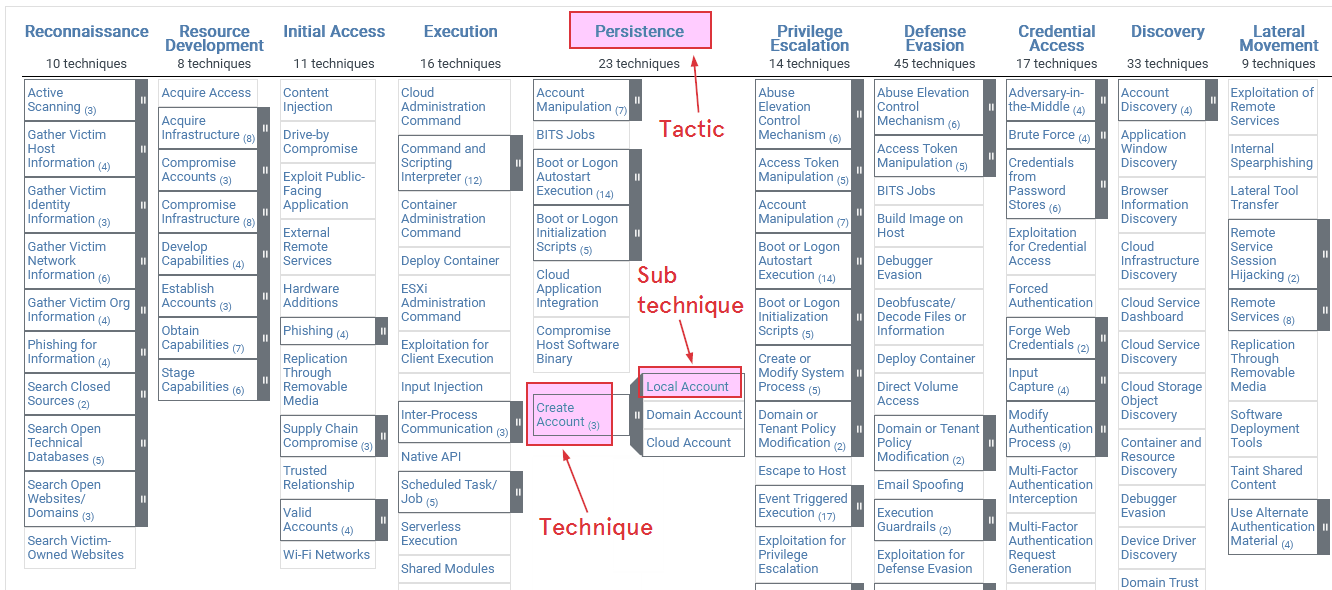
Tactic, Technique, and Sub-technique (MITRE ATT&CK)
- Tactic: High-level attacker goal at a stage of an intrusion (e.g., Initial Access, Persistence, Privilege Escalation)
- Technique: Specific method used to accomplish a tactic, describes concrete attacker behavior (tools, commands, protocols), identified by IDs (e.g., T1105, T1021)
- Examples: T1105 – Ingress Tool Transfer (downloading tools using wget or curl), T1021 – Remote Services (using SSH, RDP, or SMB for lateral movement)
- Sub-technique: More granular version of a technique showing specific implementation, IDs extend parent technique (e.g., T1003.001, T1021.002)
- Examples: T1003.001 – LSASS Memory (dumping credentials from LSASS), T1021.002 – SMB/Windows Admin Shares (accessing shares with valid credentials)
- Enables precise detection, reporting, and attribution (e.g., identifying LSASS memory dumping rather than generic credential access)
Pyramid of Pain
- Shows how difficult it is for attackers to change when certain indicators are detected
- Bottom of pyramid (low pain): Hashes, IPs, domains—easy for attackers to change and evade
- Middle of pyramid (moderate pain): Network and host artifacts (registry keys, filenames, mutexes, etc.) that map to specific ATT&CK techniques (e.g., T1547.001 – Registry Run Keys)—harder for attackers to modify
- Top of pyramid (high pain): Tools, Tactics, Techniques, Procedures (TTPs) directly aligned with MITRE ATT&CK (e.g., PowerShell abuse T1059, Process Injection T1055)—force attackers to change their operating methods
- Takeaway: Hash/IP detections = low value, easily bypassed. Behavioral, MITRE-based detections = high value, harder to evade, higher attacker cost
- Analysts use ATT&CK mapping to understand attacker intent and next steps, prioritize alerts affecting high-value assets, and guide mitigation, containment, and eradication actions across the kill chain
The Hive Platform
- Case management platform for cybersecurity incident response
- Enables teams to create cases and link multiple related alerts
- Acts as a centralized hub for security alerts from many sources
- Supports importing MITRE ATT&CK TTPs
- Allows alerts to be mapped to attacker tactics and techniques
- Improves incident analysis, context, and investigation efficiency
-
Section 3: Incident Handling Process Overview
Framework Overview
- Framework for preparing, detecting, and responding to security incidents
- Designed for IT security events
- Not a one-to-one match with Cyber Kill Chain stages
- Consists of four stages: Preparation, Detection & Analysis, Containment/Eradication/Recovery, Post-Incident Activity (Lessons Learned)
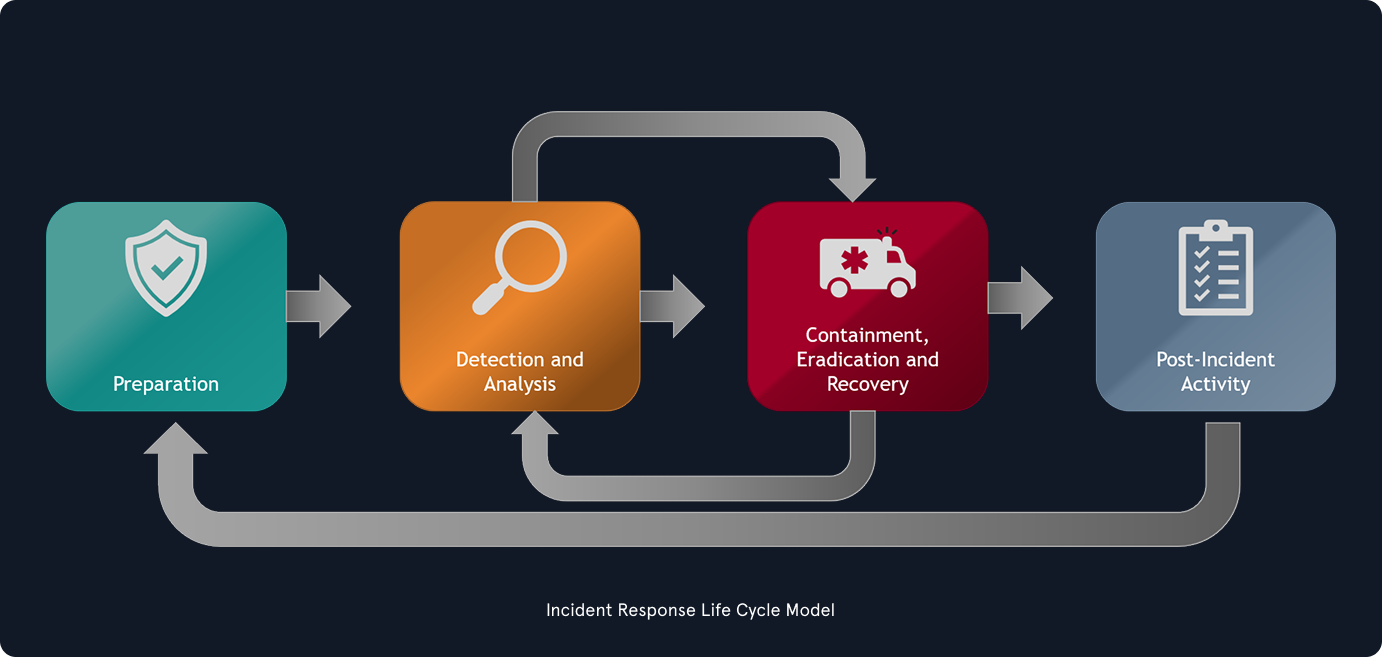
Process Characteristics
- Incident handlers spend most time in Preparation and Detection & Analysis stages
- Process is cyclic, not linear—new evidence can change next steps
- All steps must be completed fully before moving forward
- Avoid partial actions (e.g., don't contain only some infected systems while others remain compromised)
Two Main Incident-Handling Activities
- Investigation: Identify patient zero, build incident timeline, determine attacker tools/malware, document compromised systems and actions taken
- Recovery: Create and implement recovery plan, restore business operations
After Closure
- Produce incident report (cause and cost)
- Conduct lessons learned to prevent future incidents